728x90
POI 라이브러리를 이용할경우
POI필수 라이브러리 의존성들이 필요함
https://deahan.tistory.com/481
의존성 주입이 안되어있으면 의존성 주입을하고 오면됨
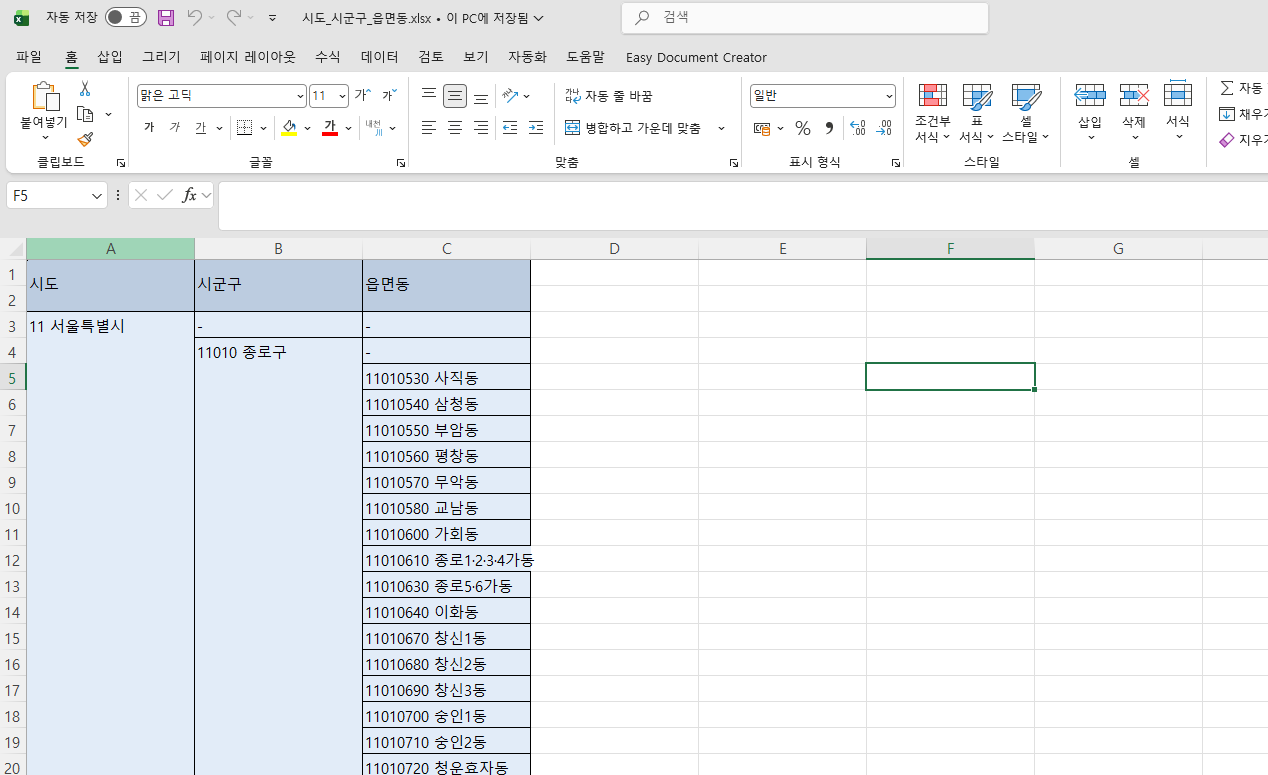
엑셀 형식은 이런식으로 되어있다
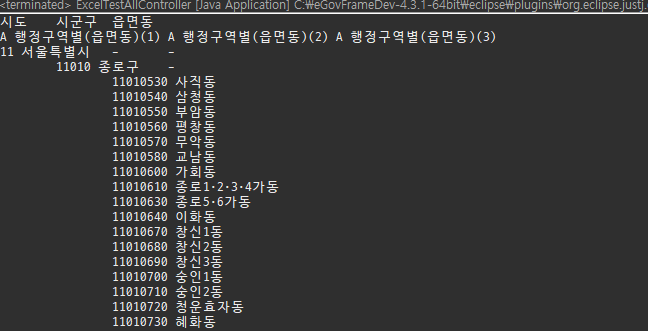
JAVA Controller : 전체 읽기 예시
package egovframework.example.blog.web;
import java.io.FileInputStream;
import java.util.Iterator;

import org.apache.poi.ss.usermodel.Cell;
import org.apache.poi.ss.usermodel.Row;
import org.apache.poi.xssf.usermodel.XSSFSheet;
import org.apache.poi.xssf.usermodel.XSSFWorkbook;


/*
 * 엑셀의 전체 파일을 읽는 예제
 * */
public class ExcelTestAllController {
	public static void main(String[] args) {
		try {

            // 1. 엑셀 파일을 읽기 위한 스트림 생성
            // ※ 현재 경로는 프로젝트 루트 기준 (실행 위치에 따라 달라질 수 있음)
            FileInputStream file = new FileInputStream("src/main/webapp/excel/시도_시군구_읍면동.xlsx");

            // 2. XSSFWorkbook 생성 (.xlsx 파일 전용)
            // 엑셀 파일 전체를 메모리에 로드
            XSSFWorkbook workbook = new XSSFWorkbook(file);

            // 3. 첫 번째 시트 가져오기 (index는 0부터 시작)
            XSSFSheet sheet = workbook.getSheetAt(0);

            // 4. 시트의 모든 행(Row)을 순회하기 위한 Iterator 생성
            Iterator<Row> rowIterator = sheet.iterator();

            // 5. 행(Row) 단위 반복
            while (rowIterator.hasNext()) {
                Row row = rowIterator.next();

                // 6. 해당 행의 모든 셀(Cell)을 순회하기 위한 Iterator
                Iterator<Cell> cellIterator = row.cellIterator();

                // 7. 셀(Cell) 단위 반복
                while (cellIterator.hasNext()) {
                    Cell cell = cellIterator.next();
                    // 8. 셀 타입에 따라 값 출력
                    switch (cell.getCellType()) {

                        // 숫자 타입 (ex: 123, 3.14)
                        case NUMERIC:
                            System.out.print(cell.getNumericCellValue() + "\t");
                            break;

                        // 문자열 타입 (ex: 텍스트)
                        case STRING:
                            System.out.print(cell.getStringCellValue() + "\t");
                            break;

                        case BOOLEAN:
                            System.out.print(cell.getBooleanCellValue());
                            break;

                        case FORMULA:
                        	switch (cell.getCachedFormulaResultType()) {
                        	case NUMERIC:
                        		System.out.print(cell.getNumericCellValue());
                        		break;
                        	case STRING:
                        		System.out.print(cell.getStringCellValue());
                        		break;
                        	}
                        	break;

                        //계산 수식
                        //case FORMULA:
                        //    System.out.print(cell.getCellFormula());
                        //    break;

                        // 그 외 타입은 예외 처리
                        default:
                            throw new IllegalStateException("Unexpected value: " + cell.getCellType());
                    }
                }
                // 9. 한 행 출력 끝나면 줄바꿈
                System.out.println("");
            }

            // 10. 파일 스트림 종료 (자원 해제)
            file.close();
            // ※ workbook.close()도 해주는 것이 좋음 (메모리 관리)
            workbook.close();

        } catch (Exception e) {
        	// 11. 예외 발생 시 에러 출력
            e.printStackTrace();
        }

	}

}
JAVA Controller : 원하는 행만 조합해서 읽기
package egovframework.example.blog.web;
import java.io.FileInputStream;
import java.util.Iterator;

import org.apache.poi.ss.usermodel.Cell;
import org.apache.poi.ss.usermodel.Row;
import org.apache.poi.xssf.usermodel.XSSFSheet;
import org.apache.poi.xssf.usermodel.XSSFWorkbook;


/*
 * 엑셀의 전체 파일을 읽는 예제
 * */
public class ExcelTestController {
	public static void main(String[] args) {
		try {

            //엑셀 파일을 읽기 위한 스트림 생성
            // ※ 현재 경로는 프로젝트 루트 기준 (실행 위치에 따라 달라질 수 있음)
            FileInputStream file = new FileInputStream("src/main/webapp/excel/시도_시군구_읍면동.xlsx");

            //XSSFWorkbook 생성 (.xlsx 파일 전용)
            //엑셀 파일 전체를 메모리에 로드
            XSSFWorkbook workbook = new XSSFWorkbook(file);

            //첫 번째 시트 가져오기 (index는 0부터 시작)
            XSSFSheet sheet = workbook.getSheetAt(0);

            //시트의 모든 행(Row)을 순회하기 위한 Iterator 생성
            Iterator<Row> rowIterator = sheet.iterator();

            //행(Row) 단위 반복
            while (rowIterator.hasNext()) {
                Row row = rowIterator.next();
                Cell sido = row.getCell(0);
                Cell sigungu = row.getCell(1);
                Cell eupmyeondong = row.getCell(2);
                int rowIndex = row.getRowNum(); // 몇 번째 열인지

                if(rowIndex > 1) {
                	if(sido.getStringCellValue() != "" && sido.getStringCellValue() != null) {
                		System.out.println("시도 " + sido.getStringCellValue() + "\t");
                	}
                	if(!"".equals(sigungu.getStringCellValue()) && sigungu.getStringCellValue() != null && !"-".equals(sigungu.getStringCellValue())) {
                		System.out.println("시군구 " + sigungu.getStringCellValue() + "\t");
                	}
                	if(!"".equals(eupmyeondong.getStringCellValue()) && eupmyeondong.getStringCellValue() != null && !"-".equals(eupmyeondong.getStringCellValue())) {
                		System.out.println("읍면동 " + eupmyeondong.getStringCellValue() + "\t");
                	}
                }
            }

            //파일 스트림 종료 (자원 해제)
            file.close();
            // ※ workbook.close()도 해주는 것이 좋음 (메모리 관리)
            workbook.close();

        } catch (Exception e) {
        	//예외 발생 시 에러 출력
            e.printStackTrace();
        }

	}

}
if문에 각 시도, 시군구, 읍면동에 각각의 DB 저장문 만들어주면 됨
'Spring' 카테고리의 다른 글
| [Spring]POI 라이브러리 메소드 및 사용법 (1) | 2026.03.18 |
|---|